
Tools
A tool lets an agent do something besides answer. Every tool is off until three separate people have said yes:
- the platform offers it, and sets ceilings on it;
- the owner (you, or your organization's admins) turns it on and configures it;
- an editor gives it to a particular agent, and publishes.
That is deliberate. A tool is the point where an agent stops producing text and starts acting.
Every call is shown in the chat as a card and recorded in the owner's audit log, with the command or URL and whether it succeeded.
Web search
Asks a search engine a question and gives the agent the best results: title, address and a short extract of each. Pair it with web fetch and an agent can find a page and then read it, instead of being told which page to read.
Choose the engine in Settings → Tools:
| Engine | Needs | Good when |
|---|---|---|
| Brave Search | an API key from their developer site | you want a hosted engine with a free tier |
| Tavily | an API key | you want results already trimmed for agents |
| SearXNG | the address of one you run | you would rather no query left your network |
The key is encrypted here, never shown again and never given to a model. Changing engine clears it, since a key from one is no use to another. Until there is something to search with, the tool is not offered to agents at all, rather than failing when one tries.
Results are things found, not instructions
Titles and extracts are written by whoever made the page, and a page can be written to talk to your agent. Agents are told to treat results as things found. The agent still cannot open any of them unless web fetch is on and the host is allowlisted.
Web fetch
Reads a web page or a JSON endpoint, and gives the agent the text.
It only reaches hosts on the owner's allowlist — nothing else is reachable, including by redirect. Patterns are exact hostnames or *.example.com for subdomains.
Private addresses (localhost, 10.x, 192.168.x) are blocked unless the platform allows it and the owner turns it on, which only makes sense on a self-hosted install where every owner is trusted. Cloud metadata addresses stay blocked regardless.
What comes back is not an instruction
A page can contain text addressed to the agent, trying to get it to do something. Agents are told to treat fetched content as data. Keep the allowlist to hosts whose content every user of that agent is allowed to see.
Workspace shell
Gives the agent a small Linux container of its own, with a /workspace directory whose files survive between commands and between conversations. Debian, with Python, git, curl, jq and ripgrep.
Good for: writing and running a script, working through a file, keeping notes or intermediate results across a long job.
What bounds it:
- No network at all, unless the platform allows it and the owner turns it on. Without it there is nothing to download and nowhere to send anything.
- Memory, CPU and a per-command time limit, set by the owner within the platform's ceilings.
- An ordinary user, no privileges, and only its own volume to write to.
The workspace belongs to the agent, not to you. Everyone who talks to that agent shares those files, in the same way they share its memory. Deleting the agent deletes them.
Give it the internet only on purpose
A workspace with no network can read and transform what it is given. A workspace with a network can fetch code and run it, and can send anything it can read to anywhere. That is a different kind of thing to hand to a model that reads web pages and documents.
Turning tools on
- Organization or personal space → Tools — what your agents may use, and how it is configured.
- Agent → Configure — which of those this agent gets. Then publish.
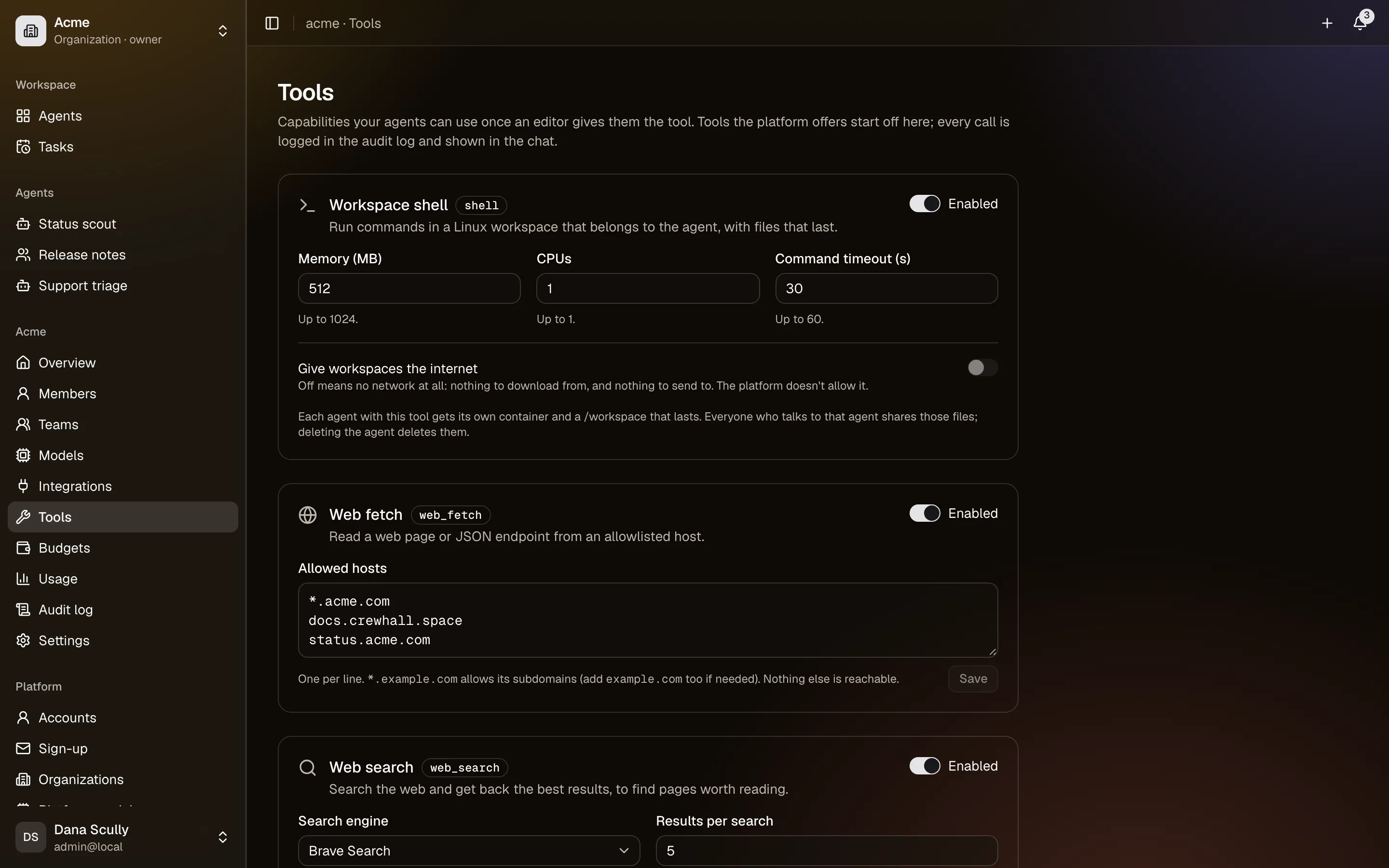
If a tool is switched off at the owner level, agents stop being offered it at once, and an agent that lists it can no longer be published until it is removed.